警告・キック・BAN
oxb の 3 つの管理記録:記録内容、手動 BAN(オフラインも)、BAN 解除、BAN の証拠。
このページはまだお使いの言語に翻訳されていません。英語版を表示しています。
Every punishment is recorded. There are three sections, one per type, and all of them show whether it was automatic (a detection) or manual (an administrator).
| Section | What it records |
|---|---|
| Warns | Warnings to players and the reason. A detection set to warn ends up here. |
| Kicks | Every player kicked, the reason and who did it. |
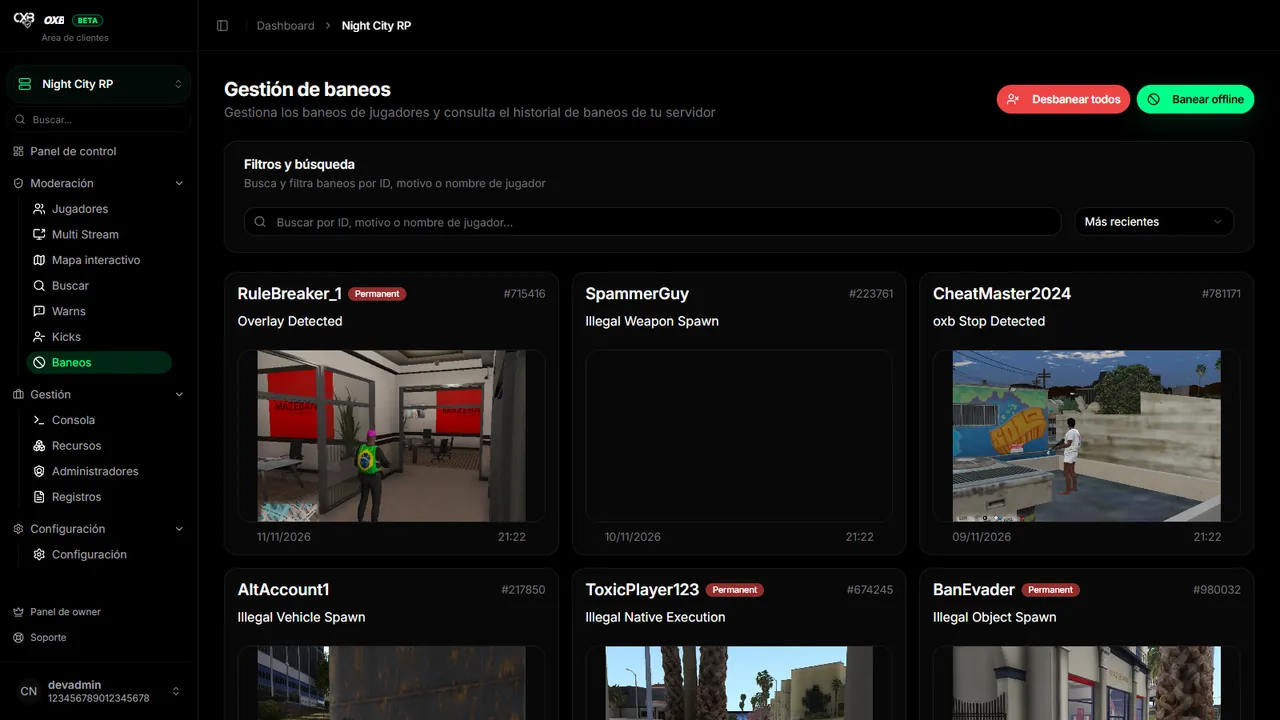
| Bans | Active bans, with evidence, expiration and banned identifiers. |
Bans#
- Search by ban ID, reason or name. Sort by date, expiration or play time.
- Open a ban to see the banned identifiers, the expiration and the cross-server bans of the player.
- Ban player / Ban offline: search the player (or type any identifier: license, Steam, Discord…), write a reason, an optional evidence URL and the ban type.
- Unban a player from their row, or Unban all (asks for confirmation and cannot be undone; requires the matching permission).
Automatic evidence#
When oxb bans for a detection it can attach two proofs, controlled in Settings → Ban system:
- Screenshot (
EnableScreenShots). - 10 second recording of what was happening (
EnableGameplayRecord).
The evidence is seen from the ban with View evidence or View video, and it is also sent to the Discord webhook of bans.
Duration and IP#
The default duration is permanent (BanDuration = -1). You can set seconds (31536000 = 1 year). With BanIpAddress on, the IP is also banned, which makes evading the ban harder.
最終更新:2026年11月11日